
9 min readUpdated
When to Automate a Process and When to Keep It Manual
A three question test for deciding which tasks to automate, which to keep manual, and where an approval gate beats both. Use it on your own ops today.

Mike
Founder & AI Automation Lead
Most automation advice pushes in one direction: do more of it. The harder question, and the one that actually decides whether your team trusts the system a year from now, is where to stop.
Founders and operations leads at 10 to 200 person companies feel this daily. You already have Zapier or n8n moving data around. Something breaks quietly, or an automated message goes out that a human would never have sent, and suddenly the whole program is on trial.
We build workflow automation for exactly these teams at Hexa AI Agency, and the automate-or-keep-manual line is the first thing we scope, before any tool gets picked.
Key takeaways
- Automate a step only when three things are true: the rules are clear, a wrong result is cheap, and you can undo it.
- Machines should get the high-volume, repetitive work first: data entry, routing, enrichment, drafting, and reminders.
- People stay on irreversible actions (money, client messages, legal), conflicting data, and anything needing judgment or empathy.
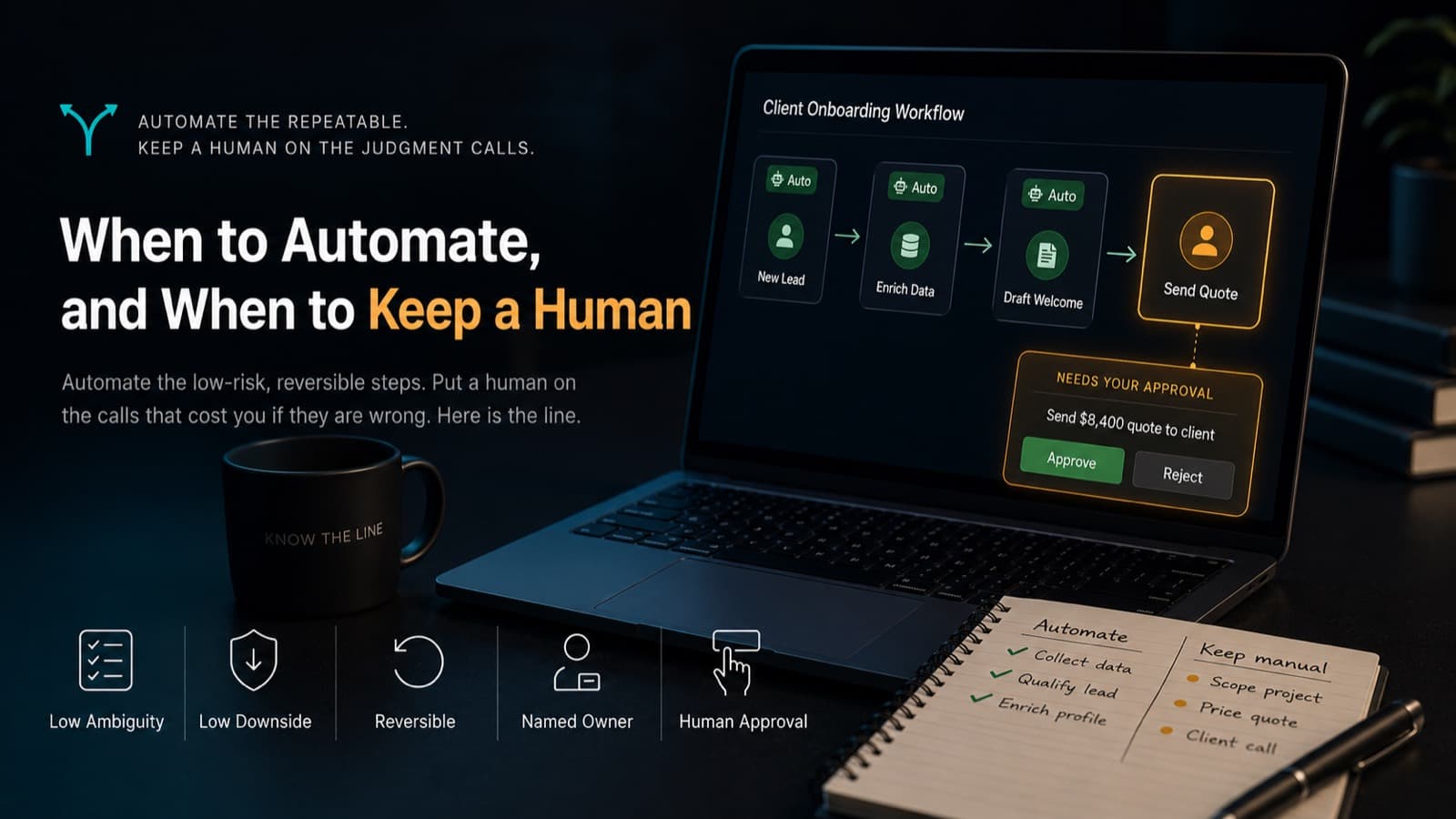
- The middle path is an approval gate: the system detects and drafts, a person approves before anything leaves the building.
- Every automation needs a named owner and an off switch, or it becomes shelfware the moment its builder moves on.
The three-question test for any step
Before automating any single step in a process, ask three questions. Is the step low ambiguity, meaning the rules can be written down and a reasonable person would apply them the same way every time? Is the downside small if the step runs wrong? Is the action reversible, so you can undo it without apologizing to anyone?
Automate the step only if all three answers are yes. If any answer is no, keep a person on it or put an approval gate in front of it. That is the whole framework. Everything else in this post is detail.
Operators who run automation in production converge on the same test. In a discussion about where automated loops break down, one practitioner described drawing the boundary around exactly these three things: low ambiguity, low downside if wrong, and a clear reversal path. The failure point is rarely whether the system can produce the next output. It is whether the system knows when the situation stopped being normal. Software does not know that. The test exists to keep software away from the moments where knowing that is the job.
Notice what the test does not ask: whether the step is technically automatable. Almost everything is now. That is precisely why the line has to be drawn on risk and reversibility instead of capability, a point we cover from the failure side in our post on silent automation failures.
What should you hand to the machine first?
The easy wins share a profile: high volume, repetitive, rules-based, reversible, and internal. Data entry from forms into your CRM. Routing inbound requests to the right queue. Enriching a new lead with firmographic data. Drafting the first version of a reply. Sending internal reminders when a task stalls. Moving records between apps that refuse to talk to each other.
Two properties make these safe. First, a mistake is cheap and contained, because the output lands inside your own systems where someone can catch it. Second, the rules fit in a sentence. "When a form is submitted, create a deal and notify the sales channel" needs no judgment.
Zapier's own guidance on when to automate a task points at the same profile: frequent or scheduled work, data moving between apps, and tasks that need no higher-order thinking. Their math is worth keeping in your head, because 15 minutes saved per workday compounds to more than 60 hours a year. Volume is what turns a trivial automation into a meaningful one.
Note the word internal. A step that writes to your project tracker and a step that emails a client can be identical technically and completely different in risk. The first is a sandbox. The second is the building's front door.
Keep a human on these, no matter how good the tooling gets
Three categories stay with people. First, irreversible or high-stakes actions: moving money, sending anything to a client, signing, filing, or deleting. You can automate everything up to the send button. The click stays human.
Second, ambiguous edge cases. Conflicting data from two sources, a model reporting low confidence, an input that matches no known pattern. One operator described the recurring nightmare of automated rules guessing between two conflicting records for a high-value account, when a person could resolve it in five seconds. That five-second human check is not friction. It is the cheapest insurance you will ever buy.
Third, anything that needs empathy, negotiation, or an actual decision. A renewal conversation, a complaint from an angry customer, a judgment call on a refund outside policy. These are relationship moments dressed up as process steps. Chasing a proposal that went quiet is the same shape: let the CRM own the timing and a person own the call, which is the split behind the 3/7/14 proposal follow-up system.
There is a deeper reason to keep skilled humans close, and it has been on record since 1983. Lisanne Bainbridge's Ironies of Automation showed that automating the routine work makes the remaining human role harder, not easier: people lose practice on exactly the skills they need for the rare moments when the system fails. If your plan assumes a person will competently catch the one bad case a month, that person needs to stay in the loop enough to still be competent when it arrives.
Put an approval gate in the middle
Between full automation and fully manual sits the pattern most teams miss: let the system do the detection and the drafting, and require a person to approve before anything irreversible happens. The machine does 95 percent of the work. The human supplies the 5 percent that is accountability.
Mechanically this is the pattern we default to in our own AI workflow automation builds, and it is simple to start. In n8n, a Wait node that resumes on a webhook call will pause a workflow, send a Slack message or email with approve and reject links, and sit there until someone clicks. Zapier and Make have equivalent patterns. That single gate converts a scary automation into a safe one the same afternoon.
As volume grows, treat the approval as its own record instead of a pause buried inside one workflow. Teams running production approvals in n8n land on the same design: a separate approval object holding the proposed action as structured data, a risk level, and a reason, so any workflow can request one and you get timeouts, escalation, and an audit trail for free.
One honest caveat: gates only work where attention is scarce enough to be real. Recent Harvard Business School research on human-AI decision workflows found that when reviewers face too many touchpoints, oversight collapses into rubber-stamping. Gate the irreversible steps, and let the reversible ones run. A gate on everything is a gate on nothing.
Who owns this thing after launch?
An automation without a named owner is a countdown clock. Someone builds the clever part, demos it, and moves on. Nobody owns the boring part: version notes, expected output, exception handling, and the authority to turn it off. A veteran who spent seven years installing automation in factories put it bluntly: the tool was never the reason it failed. Abandoned automation almost always has no operator after launch, and when the builder leaves, the next person either stops trusting the system or quietly works around it.
So every automation we ship gets three things written down before it runs. A named owner, one person, not a team. An off switch that the owner can flip without asking engineering. And a one-sentence explanation of what the workflow does, because a workflow that can explain itself in one sentence is the one people actually let run unattended. Trust is built in the logs, not the demo.
This is also where review steps earn their keep. In a thread on what makes AI workflows usable, an operator noted that clients approving outbound emails were not just approving emails. They were building trust that the system does the right thing. The gate is a trust-transfer mechanism. Once the approval log shows 200 approvals and no edits, you have earned the right to remove the gate for that step.
Run the numbers before you build anything
Some tasks fail the economics before they ever reach the risk test. If building and maintaining the automation costs more effort than the task itself, keep it manual. The canonical reference is xkcd's Is It Worth the Time? chart, which shows how much build time a task justifies across five years. A monthly task where automation saves five minutes justifies about a day of building. A quarterly one justifies an afternoon. A one-off justifies almost nothing.
The number people forget is maintenance. APIs change, form fields get renamed, a vendor deprecates a webhook. In our experience a production workflow costs roughly a tenth of its build effort every year just to keep true, and a workflow nobody maintains eventually fails silently, which is worse than not existing. We break down the full build-and-run economics in what business AI automation actually costs.
Here is a scenario we see constantly. A services firm wants to automate proposal assembly. Volume check: eight proposals a month, 40 minutes each. Risk check: the document goes to a client, so it fails question two of the three-question test. Verdict: automate the assembly and the data merge, gate the send. The partner reviews a finished draft in four minutes instead of building one in 40. That is the shape of most good answers: not automate or do not automate, but automate up to the last safe step.
The line we draw for clients before we build anything is exactly that boundary, step by step through the process. We've built enough of these to know the expensive mistake is not a missing automation. It is an automation running one step past where it should have stopped, which is how businesses that automated too early ended up rebuilding trust from scratch.
Frequently asked questions
Which tasks should you not automate?
Anything irreversible or high-stakes: payments, client-facing messages, legal filings, deletions. Anything ambiguous: conflicting records, unusual inputs, low-confidence model outputs. Anything relational: complaints, negotiations, renewals. And anything too infrequent to repay the build, per the xkcd five-year math. If the rules will not fit in a sentence or a mistake would need an apology, keep a person on it.
When should a small business automate a task?
When the task happens at least weekly, follows rules you can write down, and a wrong run is cheap to undo. Start with internal steps like data entry, routing, and reminders, where mistakes stay inside the building. Automate one process end to end before touching the next, and put a person in front of anything customer-facing until the approval log proves the system out.
What are the signs you automated too early?
You are correcting the automation's output more often than you used to do the task. Nobody can explain what a step does in one sentence. Edge cases get silently mishandled instead of escalated. And nobody owns it, so errors surface from customers rather than logs. Any of these means pull the step back behind an approval gate until the error rate earns autonomy.
What is human in the loop automation?
It is the middle path between manual work and full automation. The system handles detection, drafting, and data movement, then pauses for a person to approve, edit, or reject before anything irreversible happens. In practice it is a Slack or email approval on the last step. It keeps machine speed on the 95 percent of grunt work while a human stays accountable for the decision.
You do not need a bigger automation budget. You need a map of which steps in your operation should be automated, which should be gated, and which should stay human. That map is exactly what our free Operations Leak Audit produces: we walk your core processes, apply the three-question test to each step, and hand you the sorted list before anyone builds anything.